Kubernetes External Secrets Operator
I wanted to put a short demo together of using External Secrets Operator (ESO) to expose secrets from a vault (like Hashicorp Vault, AWS Secrets Manager, etc) to services running in kubernetes
Demo code is here in this github repo
This post is a high level overview of the components, see the repo for the full example.
Setup
-
docker for containerized development
-
kind for setting up a quick cluster
-
kubectl for accessing the cluster
-
helm for installing ArgoCD and ESO
-
and then justfile is there to wrap the commands to easier execution
Step 0 - Vault
- for the demo we'll setup Hashicorp Vault in docker compose to easily bring it up and down
- and the init-script is in the repo - it uses curl to make some secrets in vault that we'll reference later
services: vault: image: hashicorp/vault:1.18 container_name: vault ports: - "58200:8200 environment: VAULT_DEV_ROOT_TOKEN_ID: root VAULT_DEV_LISTEN_ADDRESS: 0.0.0.0:8200 volumes: - vault-data:/vault/file cap_add: - IPC_LOCK command: server -dev -dev-root-token-id=root volumes: vault-data:
- bringing up the vault instance is a simple
docker compose up(use the just recipes which somecurlcommands for checking status etc.)
curl -s http://localhost:58200/v1/sys/health | jq . # or just vault-status { "initialized": true, "sealed": false, "standby": false, "performance_standby": false, "replication_performance_mode": "disabled", "replication_dr_mode": "disabled", "server_time_utc": 1770893657, "version": "1.18.5", "enterprise": false, "cluster_name": "vault-cluster-acfb9930", "cluster_id": "4d9162f4-e501-371b-7f94-bd60052b40a3", "echo_duration_ms": 0, "clock_skew_ms": 0, "replication_primary_canary_age_ms": 0 }
Step 1 - App
- We need an app that requires secrets
- app code in repo, essentially it's a python webserver to show the vault values (obviously this would expose real secrets so it's just a demo)
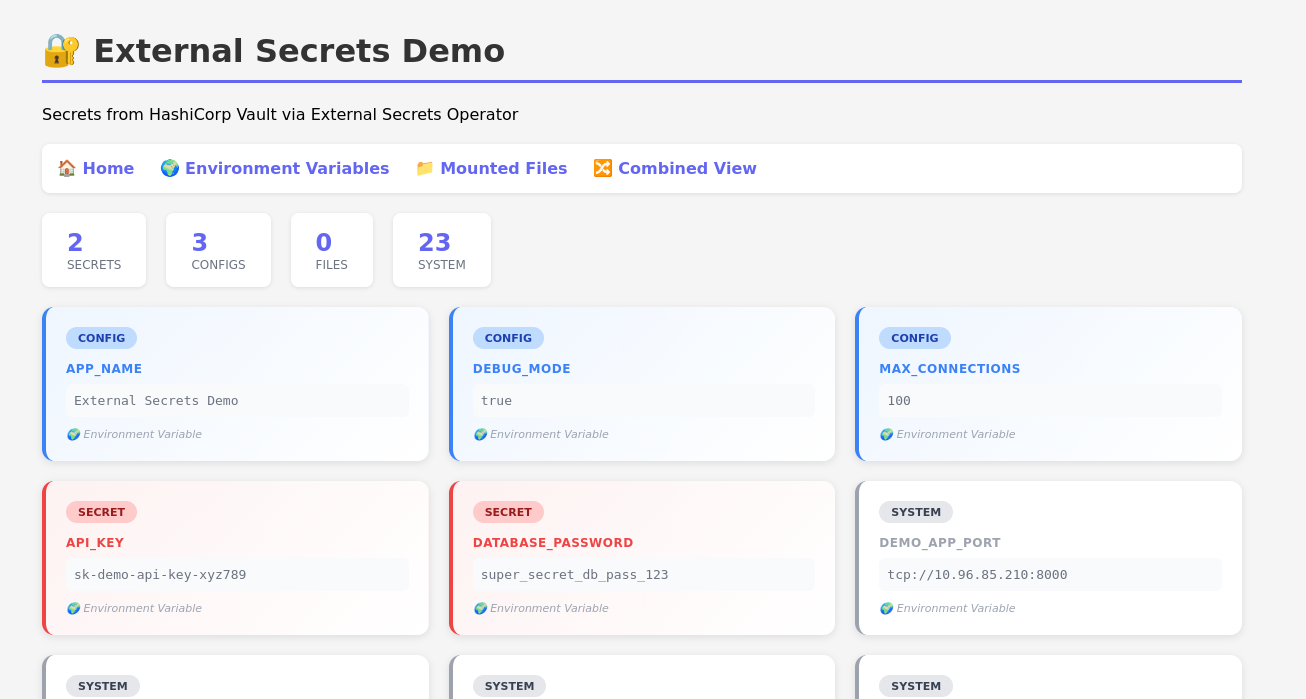
- Below is one of the endpoints in the vibe-coded app, just to illustrate that we're going to give secrets to the app as environment variables (or as mounted files!)
- In the repo, the app is included and there's a
just buildwhich builds the docker image - There is also
just deploywhich handles loading the image intokind's image cache
# example route from demo-app - see git repo @app.get("/env", response_class=HTMLResponse) def show_env(): # ESO brings Vault secrets into environment variables env_vars = dict(os.environ) # Sort by category, then by key sorted_items = sorted(env_vars.items(), key=lambda x: (classify_env(x[0]), x[0])) cards = "".join(create_card(k, v) for k, v in sorted_items) secret_count = sum(1 for k in env_vars if k in SECRET_KEYS) config_count = sum(1 for k in env_vars if k in CONFIG_KEYS) system_count = len(env_vars) - secret_count - config_count html = HTML_TEMPLATE.format( cards=cards, secret_count=secret_count, config_count=config_count, system_count=system_count, ) return HTMLResponse(content=html) def read_mounted_files(directory: str) -> dict: """Read all files from a mounted directory.""" files_data = {} if os.path.exists(directory) and os.path.isdir(directory): for filename in os.listdir(directory): filepath = os.path.join(directory, filename) if os.path.isfile(filepath): try: with open(filepath, "r") as f: files_data[filename] = f.read().strip() except Exception as e: files_data[filename] = f"<Error reading file: {e}>" return files_data
Step 2 - Cluster
- use
kindto bring up a cluster - this will start a few docker containers to act as your control-plane and workers
# kind-config.yml kind: Cluster apiVersion: kind.x-k8s.io/v1alpha4 name: eso-demo nodes: - role: control-plane extraPortMappings: - containerPort: 30080 hostPort: 58080 protocol: TCP - role: worker
kind create cluster --config kind-config.yaml --name eso-demo
Step 3 - External Secrets Operator
- installed with helm from the official helm chart
- NOTE: this is the Operator, not the secrets... this is the thing which goes to the secrets backend and creates kubernetes secrets
helm repo add external-secrets https://charts.external-secrets.io 2>/dev/null || true helm repo update helm install external-secrets external-secrets/external-secrets \ --namespace external-secrets \ --create-namespace \ --wait
In the repo this is mostly just eso-install
Step 3.5 - Secretstore
- You need a
clustersecretstoreto be the place that ESO puts secrets
apiVersion: external-secrets.io/v1 kind: ClusterSecretStore metadata: name: vault-backend spec: provider: vault: server: "http://10.10.0.1:58200" path: "secret" version: "v2" auth: tokenSecretRef: name: vault-token key: token namespace: external-secrets
Step 4 - Secrets
- Secrets go in the
clustersecretstore- in this example it's called 'vault-backend'
- In the demo we can just
kubectl apply -f <manifest>to deploy the secret to the cluster - In practice this should be handled by something more mature than raw-doggin kubectl commands
# manifests/external-secrets.yml --- apiVersion: external-secrets.io/v1 kind: ExternalSecret metadata: name: demo-app-secrets namespace: default spec: refreshInterval: "10s" secretStoreRef: kind: ClusterSecretStore name: vault-backend target: name: demo-app-secrets creationPolicy: Owner data: - secretKey: DATABASE_PASSWORD remoteRef: key: secret/data/demo-app/secrets property: database_password - secretKey: API_KEY remoteRef: key: secret/data/demo-app/secrets property: api_key
Step 4.1 - Files
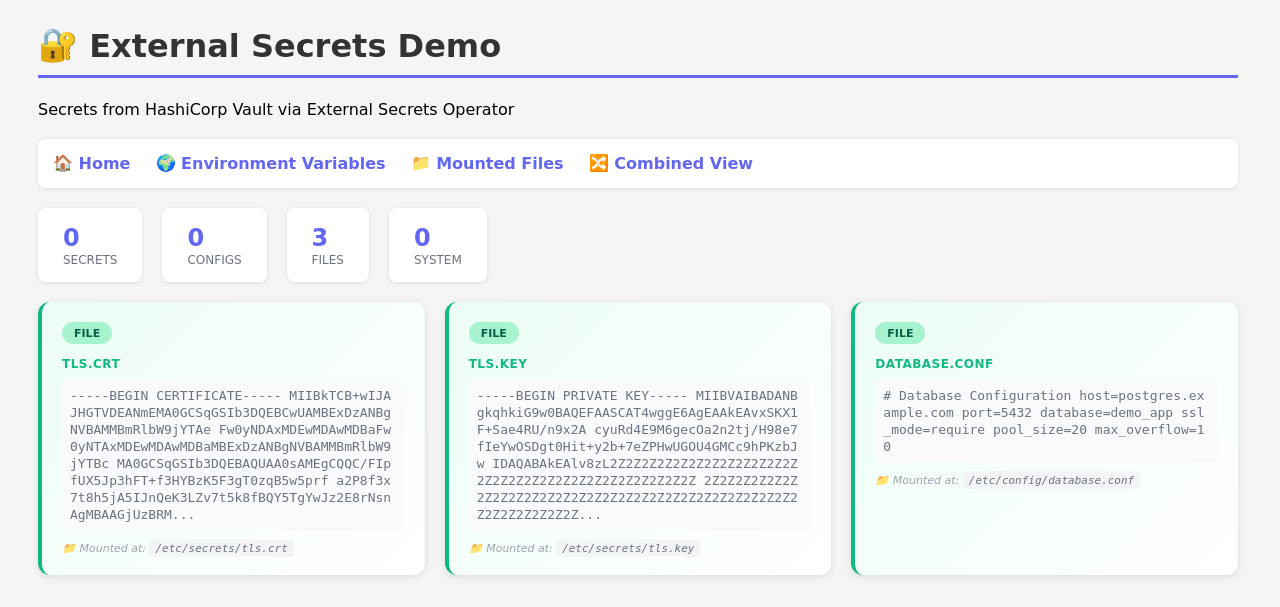
- ESO supports mounting files to containers as well through special
ExternalSecretresources - One of the example seecrets is a TLS certificate
# manifests/external-secrets-files.yml --- # File-based ExternalSecret for TLS certificates # These will be mounted as files in /etc/secrets/ apiVersion: external-secrets.io/v1 kind: ExternalSecret metadata: name: demo-app-tls-files namespace: default spec: refreshInterval: "10s" secretStoreRef: kind: ClusterSecretStore name: vault-backend target: name: demo-app-tls-files creationPolicy: Owner # Template to ensure proper file formatting template: type: Opaque data: tls.crt: "{{ .tls_crt }}" tls.key: "{{ .tls_key }}" data: - secretKey: tls_crt remoteRef: key: secret/data/demo-app/tls-files property: tls.crt - secretKey: tls_key remoteRef: key: secret/data/demo-app/tls-files property: tls.key
- Notice how there's a
spec.target.templatewhich templates out the file contents from the secret contents
Step 5 - Helm Chart
- This isn't about setting up a helm chart so I'm not going to explain a lot but the working example is simple, not secure, and in the repo
- The helm chart renders manifests - I've paired one down and added comments to the relevant things
- The thing to just take note of is the reference of the secrets in the
envFromsection
# deployment.yml apiVersion: apps/v1 kind: Deployment metadata: annotations: meta.helm.sh/release-name: demo-app meta.helm.sh/release-namespace: default name: demo-app namespace: default spec: replicas: 1 template: metadata: labels: app.kubernetes.io/instance: demo-app app.kubernetes.io/name: demo-app spec: containers: - envFrom: - secretRef: name: demo-app-secrets # name of example secret from section 4 - secretRef: name: demo-app-config # another example in the repo image: demo-app:latest # the image you built and loaded into kind - simple 'just' recipe in the repo imagePullPolicy: Never name: demo-app volumeMounts: - mountPath: /etc/secrets name: secrets-volume readOnly: true - mountPath: /etc/config name: configs-volume readOnly: true volumes: - name: secrets-volume secret: defaultMode: 420 secretName: demo-app-tls-files # example secret file from section 4.1 - name: configs-volume secret: defaultMode: 420 secretName: demo-app-config-files
Step 5.1 - Deploy
- We can deploy the demo-app from the git repo to the cluster
- For a local demo a few things happen
- local image build
- loading that image into kind (
kinddoesn't have access to your host's docker image cache, so images need to be loaded into the cluster cache)
just deploytakes care of this for you, read the recipe in the repo if you're interested in more there, the focus of this post and example are to briefly show how to use ESO though
Step 6 - Profit
The example app just displays things that are mounted in - totally vibe-coded to illustrate the secrets mounting, not the appropriate way to leak secrets.